Two formats, one tarball: building and releasing @konopskidev/ui
The components are built and tested. Now they need to become a package another application can actually install, style and use.
From source code to a package someone can use
By this point, @konopskidev/ui has most of what I wanted it to have.
The design tokens define the visual language. The components use those tokens and follow shared conventions. Their APIs are documented in Storybook, and their behaviour is covered by tests.
But there is still a difference between having a working library in a repository and having a package that another application can install.
That difference became very clear with version 0.1.2.
It was published on npm. It installed. TypeScript was happy. And yet, a consuming application could not use it reliably.
The 0.2.0 pull request starts with a short post-mortem:
The 0.1.2 tarball typed cleanly but could not be used as published: a CommonJS consumer (Jest included) could not resolve it at all, two modules shipped declarations with no JavaScript behind them, the stylesheet rendered components unstyled unless the app guessed anode_modulespath, and every client module carried'use client'twice while 29 others that need it had none.
There were four separate problems: JavaScript output, TypeScript declarations, stylesheet packaging and React Server Component boundaries.
None was caught by checking the source code or running the component tests. They appeared only after the package was built and installed somewhere else.
That changed how I approached the final part of the project. I stopped treating dist as a build by-product and started treating it as the product. The thing that matters is not whether the source compiles; it is whether the tarball works for someone installing it.
Decide what the package should expose
Before looking at the build, it helps to understand the shape I wanted consumers to see.
The package supports two ways of importing components:
- The root entry point exposes components that work with the library's core dependencies.
- Deep imports expose individual modules, including components that depend on heavier optional packages.
The stylesheet has its own public entry point:
1import '@konopskidev/ui/styles.css';This gives consumers a small surface area. They install the package, install optional peers only when they use the components that need them, and import the stylesheet once.
The package also ships both ESM and CommonJS. ESM is the default for modern bundlers, while CommonJS keeps the package usable in environments such as Jest that still resolve require().
That sounds like a straightforward build target. The tricky part is making sure every public entry has matching JavaScript and type declarations in the format its consumer expects.
Give every module a build entry
The first problem in 0.1.2 came from how the build discovered its inputs.
The build started from src/index.ts. Rollup then emitted the modules reachable from that file. That works until a module is exposed through a wildcard subpath but is not re-exported from the root barrel.
That was the case for lib/highlighter and hooks/use-highlighted-code. TypeScript generated declarations for them, but Rollup never emitted their JavaScript. The subpath looked valid to the type-checker and failed at runtime.
I fixed this by making the entry list explicit: every publishable TypeScript module under src becomes an entry in its own right.
1/**
2 * The build's entry points.
3 *
4 * Rollup only emits what an entry reaches. Driving the build from `src/index.ts`
5 * alone silently dropped modules that are exported through a wildcard but never
6 * re-exported from the barrel (`lib/highlighter`, `hooks/use-highlighted-code`):
7 * `tsc` wrote their `.d.ts`, rollup wrote no JavaScript, and the subpath typed
8 * fine while failing at runtime.
9 *
10 * Making every publishable module its own entry keeps the one-file-per-module
11 * layout without depending on reachability. Rollup's own documentation recommends
12 * this over `output.preserveModules` when the goal is to preserve a file tree.
13 */
14export function discoverEntries() {
15  const entries = walk(SRC)
16    .filter((file) => /\.tsx?$/.test(file) && !EXCLUDED.some((rule) => rule.test(file)))
17    .map((file) => path.relative(SRC, file).split(path.sep).join('/'))
18    .sort();
19
20  return Object.fromEntries(
21    entries.map((relative) => [relative.replace(/\.tsx?$/, ''), path.join(SRC, relative)]),
22  );
23}
The exclusion list keeps tests and stories out of the package. Everything else gets an entry, so a component or utility does not need to be re-exported from the root just to make its deep import work.
There is one exception to the two-format rule. lib/highlighter and hooks/use-highlighted-code depend on Shiki, which does not provide the CommonJS build this package needs. Trying to emit a .cjs version would produce a file that fails as soon as a consumer requires it.
I keep those exceptions explicit:
1/**
2 * Modules that can only ship as ESM, so the CommonJS pass skips them and the
3 * `exports` map lists them without a `require` condition. `shiki` has no
4 * CommonJS build (`main` is `dist/index.mjs`), so a `.cjs` copy would throw the
5 * moment a consumer required it.
6 */
7export const ESM_ONLY_MODULES = ['lib/highlighter', 'hooks/use-highlighted-code'];
This is a small but important distinction: the goal is not to produce every possible file for every module. The goal is to publish only formats that actually work.
Build ESM and CommonJS into the same directory
With the entry list in place, the build runs twice using the same Vite configuration.
The first pass emits ESM files. The second emits CommonJS files alongside them:
1/**
2 * `pnpm build` runs this config twice, once per mode: `es` writes `dist/**\/*.js`
3 * and clears the directory, `cjs` adds `dist/**\/*.cjs` next to it. Two passes
4 * rather than two outputs because the CommonJS one ships a smaller entry set.
5 */
6export default defineConfig(({ mode }) => {
7  const format = mode === 'cjs' ? 'cjs' : 'es';
8  const extension = format === 'es' ? '.js' : '.cjs';
9
10  return {
11    build: {
12      lib: {
13        entry: format === 'es' ? discoverEntries() : discoverCjsEntries(),
14        formats: [format],
15      },
16      outDir: 'dist',
17      // The second pass adds to the first pass's output instead of removing it.
18      emptyOutDir: format === 'es',
19      rollupOptions: {
20        external: (id) =>
21          id.includes('node_modules') || (!id.startsWith('.') && !id.startsWith('/')),
22        output: {
23          entryFileNames: `[name]${extension}`,
24          chunkFileNames: `chunks/[name]-[hash]${extension}`,
25        },
26      },
27      sourcemap: true,
28      minify: false,
29    },
30  };
31});
The order is important. The ESM pass clears dist; the CommonJS pass must leave it alone and add its output to the same directory.
The external predicate keeps dependencies outside the bundle. React, Radix and packages such as recharts should remain dependencies resolved by the consuming application, not copies embedded in every output file. The only shared output is the interop helper chunk.
I also leave minification disabled. The consumer's bundler can minify the application as a whole. Shipping readable library output makes debugging easier when something goes wrong.
Make the declarations match both formats
JavaScript is only half of a TypeScript package. The declarations need to resolve in the same module context as the code they describe.
For a dual ESM/CommonJS package, that means shipping two declaration sets:
.d.tsfiles for the ESMimportbranch..d.ctsfiles for the CommonJSrequirebranch.
TypeScript emits the first set. The build creates the second by copying the declarations and adjusting their relative imports to point at the CommonJS files:
1const source = fs
2  .readFileSync(file, 'utf8')
3  // The `.map` files are not copied, so the reference would dangle.
4  .replace(/^\/\/# sourceMappingURL=.*$/gm, '')
5  .replace(/(['"])(\.{1,2}\/[^'"]*)\.js\1/g, (match, quote, specifier) => {
6    return `${quote}${specifier}.cjs${quote}`;
7  });
There is another detail to handle before that rewrite. TypeScript can preserve a relative import without an extension, while the emitted JavaScript uses explicit extensions. Node's ESM resolver and the node16 checks performed by attw expect the declaration to refer to the file that will actually be loaded.
The build resolves the declaration target and adds .js when the matching declaration exists:
1function resolveExtension(fromFile, specifier) {
2  if (!specifier.startsWith('.')) return specifier;
3  if (/\.[cm]?jsx?$|\.json$|\.css$/.test(specifier)) return specifier;
4
5  const target = path.resolve(path.dirname(fromFile), specifier);
6  const candidates = [`${target}.d.ts`, path.join(target, 'index.d.ts')];
7
8  return candidates.some((candidate) => fs.existsSync(candidate)) ? `${specifier}.js` : specifier;
9}
Both rewrites solve the same class of problem: declarations must describe files that exist and that the runtime resolver can find. A package that type-checks but points to missing JavaScript is not a working TypeScript package.
Describe the public API in package.json
The exports field is where the build output becomes a public API.
For each entry, consumers need the correct file depending on whether they use import or require, and TypeScript needs the matching declaration file. The root entry and component subpaths look like this:
1{
2  "exports": {
3    ".": {
4      "import": { "types": "./dist/index.d.ts", "default": "./dist/index.js" },
5      "require": { "types": "./dist/index.d.cts", "default": "./dist/index.cjs" }
6    },
7    "./components/*": {
8      "import": { "types": "./dist/components/ui/*.d.ts", "default": "./dist/components/ui/*.js" },
9      "require": {
10        "types": "./dist/components/ui/*.d.cts",
11        "default": "./dist/components/ui/*.cjs"
12      }
13    },
14    "./styles.css": "./dist/styles/globals.css",
15    "./package.json": "./package.json"
16  }
17}
The real map also includes lib/*, hooks/* and the ESM-only subpaths. Those last two entries intentionally have no require condition.
There is also a decision about what belongs in the root barrel. I don't want importing a basic Button to pull in every optional dependency used by the library. Components that need heavier peers are available through deep imports instead.
The current split is 52 components in the root barrel and eleven available only through their own subpaths. Those eleven are:
Component | Optional peer |
|---|---|
| |
| |
| |
| |
| |
| |
| |
| |
| |
| |
| |
The list is kept in the barrel generator:
1/** Component → the optional peer it needs. Mirrors the README table. */
2const OPTIONAL_PEER_COMPONENTS = [
3  'calendar', // react-day-picker
4  'carousel', // embla-carousel-react
5  'chart', // recharts
6  'combobox', // @base-ui/react
7  'command', // cmdk
8  'drawer', // vaul
9  'input-otp', // input-otp
10  'message-scroller', // @shadcn/react
11  'questionnaire', // @shadcn/react
12  'resizable', // react-resizable-panels
13  'sonner', // sonner
14];
Running pnpm barrel regenerates src/index.ts from this policy. When a new component needs an optional peer, I add it to this list rather than relying on someone to remember not to export it from the root.
The corresponding packages are marked optional in peerDependenciesMeta. That way, installing the UI library does not install every heavy peer. A consumer only needs the extra dependency if they import the component that uses it.
The distinction is useful in practice: the root import stays lightweight, while a deep import makes the dependency requirement explicit.
Figure 1 — The root entry point works with the core dependencies; components with heavier peers are available through their own subpaths.
Package the stylesheet, not just the components
The stylesheet is another public entry point, and it needs the same attention as the JavaScript.
In the earlier package, styles.css resolved into src. That meant a change to the build layout could break the stylesheet independently of the components.
There was also a Tailwind-specific problem. Tailwind does not scan files inside node_modules by default. A consumer could import the package stylesheet successfully, render a component, and still get no utility classes. There was no build error or console warning; the component simply appeared unstyled.
The package needs to register its own compiled component files as Tailwind sources. I append that registration to the stylesheet in dist:
1const SOURCE_REGISTRATION = `
2/*
3 * Register this package's own modules as Tailwind sources.
4 *
5 * Tailwind does not scan \`node_modules\`, so without these lines every component
6 * renders unstyled with no error anywhere. The paths are relative to this file,
7 * which is why they work from a consumer's install without configuration.
8 */
9@source '../components';
10@source '../lib';
11@source '../hooks';
12`;
There are two reasons this happens during the build rather than in the source stylesheet.
First, the whole styles directory is copied into dist, not just globals.css. That file imports sibling files such as tokens.css and prose.css using relative paths. Copying only the entry stylesheet would leave those imports pointing at files that were never published.
Second, Tailwind resolves each @source path relative to the stylesheet that declares it. Once the registration is appended to dist/styles/globals.css, the paths point to the package's own output directories. The consumer does not need to know where the package lives inside node_modules or add its own source registration.
Keeping this generated registration out of src also means Storybook can continue compiling the source stylesheet directly from a checkout where dist might not exist. The source stylesheet and the published stylesheet have different jobs: one is used during library development, the other carries the information a consumer's Tailwind build needs.
Test the thing consumers will install
At this point, the build emits JavaScript, declarations and styles, and package.json describes how to reach them. But I don't consider that enough.
The failures in 0.1.2 all lived in the built package, so the checks need to inspect the built package too.
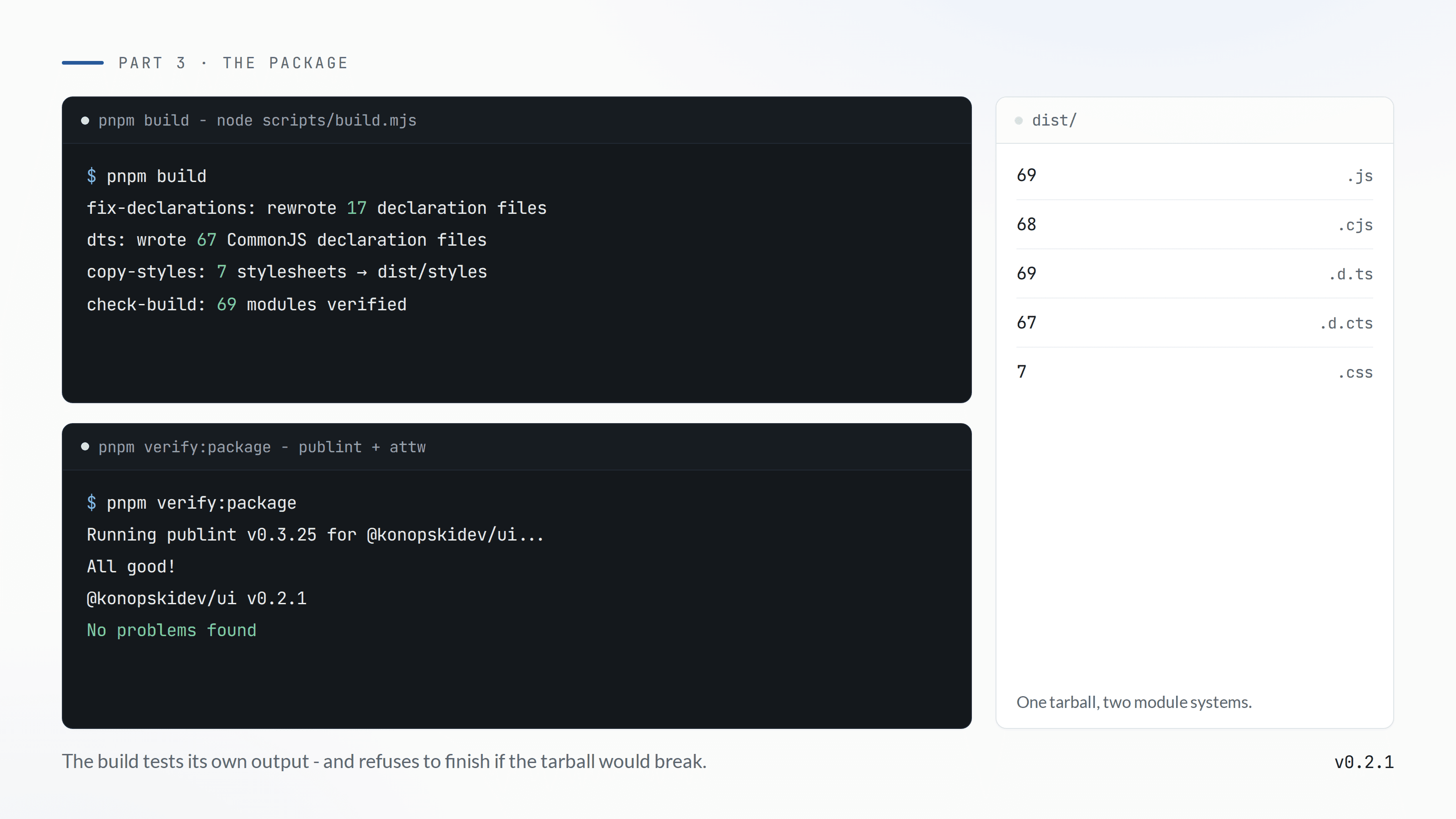
The build script ends with check-build. It verifies the contents of dist rather than relying on the source tree:
- Every entry has the output files required by its module format:
.js,.cjs,.d.tsand.d.cts, except for the explicitly ESM-only modules. - Every emitted client directive is present exactly once and as the first statement. Files without a client directive must not gain one.
- Every target declared in
package.jsonexists. Wildcard export families are checked using representative entries such ascomponents/button,lib/utilsandhooks/use-mobile. - No unexpected output files are left behind, apart from the shared CommonJS interop chunk.
These checks cover the problems that a normal component test suite cannot see. But there is still one more level: install the actual tarball in a separate project and try to use it.
That's what scripts/test-package.mjs does. It runs npm pack, extracts the resulting archive into a temporary consumer directory and links only the core dependencies. The optional peers are deliberately absent.
The test then checks that the package can be used from CommonJS:
1const ui = require('@konopskidev/ui');
2assert.equal(typeof ui.Button, 'function');
3assert.equal(typeof ui.Card, 'function');
4assert.equal(typeof ui.Dialog, 'function');
5assert.equal(typeof ui.Table, 'function');
6assert.equal(typeof require('@konopskidev/ui/components/button').Button, 'function');
7assert.equal(typeof require('@konopskidev/ui/components/card').CardImage, 'function');
8// …the lib and hooks subpaths, and the same assertions for the ESM entry
9
10// A component whose peer is not installed stays out of the barrel…
11assert.equal(ui.ChartContainer, undefined, 'chart must not be re-exported from the root');
12
13// …and asks for that peer only when its deep import is used.
14assert.throws(
15  () => require('@konopskidev/ui/components/chart'),
16  /recharts/,
17  'the chart must report its missing optional peer',
18);
The same test also checks the stylesheet. It creates a small Tailwind build that imports only @konopskidev/ui/styles.css, then looks for utilities used by the components, including z-[var(--z-index-modal)], data-slot and rounded-sm.
This is important because the missing Tailwind classes did not cause a compilation error in the consumer. The test makes that silent failure visible: if the package's source registration stops working, the generated CSS will be missing classes and the package test will fail.
Finally, the package metadata is checked with publint and attw:
1publint && attw --pack . --profile node16 --exclude-entrypoints ./styles.css ./lib/highlighter ./hooks/use-highlighted-codeattw checks the import and require branches using the node16 resolution profile. The exclusions are deliberate: the stylesheet is an asset, and the two Shiki-related modules are ESM-only, so neither has a CommonJS branch to validate.
All of these steps are part of the same verification command:
1pnpm verify # lint → tsc → test → build → test:package → publint + attwFigure 2 — The verification steps run in dependency order, from source checks through to installing and testing the package.
The important shift is that a successful build is no longer just “Vite finished”. It means the generated files exist, the exports point to them, the stylesheet works in a consumer build, and the packed archive can actually be installed and imported.
Automate the release
Once the package can verify itself, the remaining work is to make releases repeatable.
I use a GitHub Actions workflow that is triggered manually through workflow_dispatch. It asks for only two inputs: the version bump and whether this should be a dry run.
1on:
2  workflow_dispatch:
3    inputs:
4      version_bump:
5        description: 'Version bump type'
6        required: true
7        type: choice
8        default: patch
9        options:
10          - patch
11          - minor
12          - major
13      dry_run:
14        description: 'Build, verify and preview the changelog without tagging or publishing'
15        required: false
16        type: boolean
17        default: false
I deliberately don't ask for a version string. The workflow calculates the next version from the current package version, so releases stay in sequence and there is no opportunity to accidentally type a version that has already been used.
The bump is applied with:
1pnpm version --no-git-tag-versionThis updates package.json without creating a local Git tag. The root package version is not recorded in pnpm-lock.yaml, so there is no lockfile change to include in the release commit.
Generate the changelog before committing
The workflow generates the changelog before creating the release commit:
1- name: Generate the changelog
2  uses: orhun/git-cliff-action@v4
3  with:
4    config: cliff.toml
5    args: --verbose --tag "v${{ steps.version.outputs.version || '0.0.0-preview' }}"
The explicit tag tells git-cliff to collect the changes since the previous tag and label them with the version being released.
Doing this before the release commit is intentional. Otherwise, the generated notes could include their own chore: release commit. The changelog is regenerated in full, which also keeps the notes for earlier versions instead of replacing them with only the latest changes.
Commit, tag, verify and publish
After the changelog is ready, the workflow follows a fixed order:
- Commit the updated
package.jsonandCHANGELOG.md. - Create and push the
vX.Y.ZGit tag. - Build the package.
- Run
verify:packageagain against the version being released. - Publish the package to npm with provenance.
- Create the GitHub release.
The ordering is doing real work here.
- Push before publishing: the Git tag exists when npm records the package provenance.
- Publish before creating the GitHub release: a failed npm publish cannot leave a GitHub release pointing to a version that does not exist on the registry.
- Verify immediately before publishing: the release job checks the package again, rather than relying only on a previous run on the main branch.
- Serialize release runs:
concurrency: releaseprevents two manually dispatched workflows from trying to bump and publish versions at the same time. It does not cancel an in-progress release.
Authentication uses npm trusted publishing through GitHub Actions OIDC, with id-token: write. Once configured, subsequent releases do not need a long-lived npm token stored as a GitHub secret.
There is one first-release wrinkle: npm only offers trusted-publisher configuration for a package that already exists. For the initial publication, either publish the first version manually and then configure the trusted publisher, or use a granular NPM_TOKEN for that first workflow run.
Figure 3 — The changelog is generated before the release commit, and the GitHub release is created only after npm accepts the package.
Use a dry run before the real release
The dry_run input follows the same preparation path: it generates the changelog, builds the package and runs the verification steps. It then prints the generated notes and the exact file list that npm pack would publish.
What it does not do is commit, tag, push, publish or create a GitHub release.
I find this useful because it lets me inspect the release before making it permanent. npm package versions cannot be reused once published, so it is worth catching mistakes before the workflow reaches that point.
Install it in another application
The final check is the one that matters most: use the released package from a consumer application.
The installation is intentionally simple. Add the library, then install optional peers only for the components you plan to use:
1pnpm add @konopskidev/ui
2pnpm add recharts            # only if you import @konopskidev/ui/components/chart
Then import Tailwind and the library stylesheet in the consumer's global CSS:
1/* app.css */
2@import 'tailwindcss';
3@import '@konopskidev/ui/styles.css';
That's all the styling setup needs. There is no manual @source registration and no path into node_modules to maintain. The published stylesheet registers the package's own component files for Tailwind.
The consumer application remains responsible for a couple of theme-level choices. Dark mode is controlled by a .dark class on an ancestor, usually <html>. The --font-* variables come from the app; in my own site, I define them with next/font. Every font has a fallback, so a Vite application that does not define those variables still gets a usable result.
The components also preserve the React Server Components boundaries discussed in Part 2. Components that use hooks or client-only primitives carry 'use client' and render on the client. Hook-free components such as Card, Badge, Button, Table and Input remain server-compatible.
That distinction matters when using the library in a Next.js application. For example, I can import buttonVariants() in a Server Component and use it to style a Next.js <Link> without turning the whole component into a client component.
CommonJS consumers work too. Since the package ships a CommonJS build, Jest can resolve:
1const { Button } = require('@konopskidev/ui');There is no need for a moduleNameMapper, a package transform or a transformIgnorePatterns exception just to load the library.
One practical detail caught me while testing fresh releases: pnpm quarantines packages published within the last 24 hours. If you're publishing and immediately installing the package in a consumer project, add it to minimumReleaseAgeExclude in pnpm-workspace.yaml; otherwise, pnpm may make you wait for the release you just published.
The package is the product
Looking back, the most useful lesson from this project is that the source repository is only one part of a component library.
Part 1 was about defining a visual language and giving the components a shared foundation. Part 2 was about implementing those components with consistent APIs, documentation and tests. This final part was about making that work portable: building the right files, describing the public entry points, shipping the stylesheet, and automating the release.
The 0.1.2 problems were not especially exotic. They were mismatches between declarations and JavaScript, an incomplete entry list, a stylesheet that depended on source paths, and client directives that did not match the components' actual requirements.
The compiler could not catch those problems because they were not problems in the source. They were problems in the package consumers received.
That's why the build now tests the output, and why the release workflow verifies the packed package before publishing it. A green source build is useful, but a package that another application can install, import and style is the real result.
With that, the three parts come together: a design foundation, a component library built on top of it, and a repeatable way to ship it to the applications that use it.