Creating an articles service
Let's build a service to provide our blog page with articles from markdown files
Introduction
Previously (See here) we focused our attention on preparing tools which now are going to make sure that the code we produce is consistent. But now it is time to start building actual functionality for our website. We will start by creating a service which will provide us with articles. Those articles are going to be written in Markdown as I mentioned in Getting Started. Markdown is really easy to use and provides a lot of different styles and formatting to our text, storing everything in simple text files. Thanks to that we have a lightweight and easy to use way of storing our articles. But let's jump into code. As before I am creating a separate branch to work on this new feature.
1git checkout -b create-articles-serviceMarkdown files
We of course are going to store everything just in .md plain text files, but we would also like to have some metadata for each of our articles. I am thinking about these properties:
1title: our article title
2description: our article description
3createdAt: article creation date
These are the basic information which we are going to use.
This information we will store as a front-matter, which is basically YAML formatted data placed at the beginning of each article file. For example:
1---
2title: what is frontmatter
3description: how to use frontmatter in your md files
4createdAt: 2000-01-01 00:00
5---
6# Here goes the heading
7And here the contentFiles structure
So, let me describe here how I want to structure the code and the data.
- All our articles we are going to store in the
contentfolder in the root directory. Inside this folder we can create new folders to store related articles. - All services and in general code not related to web pages and visual components we are going to keep inside
src/lib. - I want to keep our code clean and possibly decoupled, so we are going to create interfaces and make our services implement those. In the future if for whatever reason we might want to replace our service which reads articles from files with one which reads them from database, we will just implement the same interface in then new service and replace the old one without a need to replace any methods or anything more. To achieve this we will have
interfacesandservicesdirectories insrc/libfor our interfaces and implementations respectively.
Creating interfaces
Building our articles service we will start by creating some interfaces. Why interfaces? Because we aren't going to put everything into one class and call it a day. We are going to create more than one service to keep related functionalities separate from each other. We are going to have two interfaces for now - ArticleService which will transform markdown files content into Article objects and FileService which will, as the name may suggest, take care of reading files. So in lib/interfaces we create these files:
1ArticleService.ts
2FileService.ts
3index.tsFileService Interface
We want our service to read files and directories tree for us, so we can then use this data to group articles. We also want to simply read file content, so we can later use it in ArticleService. I also already know we will need method for reading file stats.
Our FileService.ts looks like so
1import { Stats } from 'fs';
2type Paths = { absolutePath: string; relativePath: string };
3export type FilePath = Paths & { fileName: string };
4export type DirectoryPath = Paths & { directoryName: string };
5export type FilesTree = { directory: DirectoryPath; children: (FilePath | FilesTree)[] };
6export interface FileService {
7  getTree(directory: string): (FilePath | FilesTree)[];
8  readFileContent(path: string): string;
9  getFileStats(path: string): Stats;
10  isFilesTree(file: FilePath | FilesTree): file is FilesTree;
11  isFilePath(file: FilePath | FilesTree): file is FilePath;
12  isDirectory(file: FilePath | DirectoryPath): file is DirectoryPath;
13}
We define our interface and some types describing The structure of data.
ArticleService.ts Interface
Here we need a method to get all our articles and a single article based on the slug. Also, we will need a method to get articles paginated, so we don't have to list them all on a single page. This is our ArticleService.ts
1import { Article, PaginationParams, PaginationResponse } from '@/lib/types';
2export interface ArticleService {
3  getAll(): Promise<Article[]>;
4  getOneBySlug(slug: string): Promise<Article>;
5  getPage(params: PaginationParams): Promise<PaginationResponse<Article>>;
6}
As you can see we have some imports from @/lib/types. I created this file in the lib folder to keep there some common types which are not strictly connected to the article service but will also be used in other places. Normally type declarations, and in general any functions, variables and so on, should be declared as close to their scope as possible. This indicates in which scope the function or anything else we declare is used.
Exports in index.ts
Before I show you what do we have in types.ts let's finalize the interfaces with the index.ts. We are just doing a few exports here.
1export type { ArticleService } from './ArticleService';
2export type { DirectoryPath, FilePath, FileService, FilesTree } from './FileService';
Why do we even have this file? Well, the answer is, to make imports in other files later on more organized. If we left just the exports in, for example, FileService.ts and ArticlesService.ts, we will have to import it in other places like so
1import { FileService } from '@/lib/interfaces/FileService';
2import { ArticlesService } from '@lib/interfaces/ArticlesService';
This maybe looks okay but imagine now having to import 20 different services, we would end up with 20 lines of imports on the top of our file. We also don't need to know exactly where is each service coming from. With the index.ts file the same imports look like this instead:
1import { ArticlesService, FileService } from '@/lib/interfaces';Much cleaner, huh?
Shared types in types.ts
So what types do we want to declare here? What do we need? For sure, we have to declare how our Article object will look like. It will be built from ArticleMetadata and actual article content. The ArticleMetadata will contain all the properties other than the article content itself which are coming mostly from ArticleFrontmatter. The last type just describes the front-matter properties we decided to put in each article.
1export type ArticleFrontmatter = {
2  title: string;
3  description: string;
4  createdAt: string;
5};
6export type ArticleMetadata = Omit<ArticleFrontmatter, 'createdAt'> & {
7  date: Date;
8  slug: string;
9  topic?: string;
10};
11export type Article = ArticleMetadata & {
12  content: string;
13};
14export type PaginationParams = { page: number; limit?: number; firstPage?: number };
15export type PaginationResponse<T> = {
16  items: T[];
17  hasNextPage: boolean;
18  hasPreviousPage: boolean;
19  pageCount: number;
20};
The slug in our ArticleMetadata is a kind of ID we are going to use to identify each article and to use in browser to navigate to the article. topic refers to the name of the sub-folder we might want to create to keep similar articles together. date is either the createdAt from front-matter or the file modification date if createdAt is not present for some reason and then transformed to the Date object. One interesting thing here as well is the PaginationResponse type which is using a generic type T to describe the items. This way we can use it basically for any kind of object, not only articles.
Implementing files service
Our articles service will need a way to read files, so we have to start with the files service first. We simply call this service FileService. So we are creating FileService folder inside service with FileService.ts and index.ts inside.
Building FileService class
We are going to use classes to provide encapsulation and also to be able to implement interfaces. In our FileService.ts we declare our class structure.
1import { Stats } from 'fs';
2import { FilePath, FileService as FileServiceInterface, FilesTree } from '@/lib/interfaces';
3// ...
4export class FileService implements FileServiceInterface {
5  getTree(directory: string): (FilePath | FilesTree)[] {}
6  readFileContent(path: string): string {}
7  getFileStats(path: string): Stats {}
8  isFilesTree(file: FilePath | FilesTree): file is FilesTree;
9  isFilePath(file: FilePath | FilesTree): file is FilePath;
10  isDirectory(file: FilePath | DirectoryPath): file is DirectoryPath;
11}
This is the skeleton of our class. Now we are going to build each method.
getTree
Let's start with the hardest part, as this function will be recursive and will traverse the files tree in a given directory, giving us back description of that tree in form of an array of containing nested files and directories. This can be done with the following code:
1import path from 'path';
2import { Dirent } from 'fs';
3// ...
4getTree(directory: string): (FilePath | FilesTree)[] {
5    let filesTree: (FilePath | FilesTree)[] = [];
6    const files = this.readDir(directory);
7    for (const file of files) {
8      const absolute = path.join(directory, file.name);
9      const relative = path.relative(process.cwd(), absolute);
10      if (file.isDirectory()) {
11        filesTree = filesTree.concat({
12          directory: {
13            absolutePath: absolute,
14            directoryName: file.name,
15            relativePath: relative,
16          },
17          children: this.getTree(absolute),
18        });
19      } else {
20        filesTree.push({
21          absolutePath: path.join(directory, '/'),
22          fileName: file.name,
23          relativePath: relative.replace(file.name, ''),
24        });
25      }
26    }
27    return filesTree;
28  }
29  private readDir(directory: string): Dirent[] {
30    return fs.readdirSync(directory, {
31      withFileTypes: true,
32    });
33  }
Here we pass the directory which we want to build the files tree for as a parameter. Then we read all the files and directories within the given directory, and we loop through them. If the element is a file we simply save it in the resulting array as a FilePath object. In case we encountered a directory we build the DirectoryPath object. To get the directory children, we are calling the getTree again, passing path to the directory we are currently building. This approach builds a nested tree structure.
getFileStats
Now it's time to implement the method which will provide us with information about the file or a directory. We are starting with this method, because readFileContent will make use of it. The function implementation looks like this:
1import fs, { Dirent, Stats } from 'fs';
2 // ...
3  getFileStats(path: string): Stats {
4    if (!fs.existsSync(path)) {
5      throw new Error(`File on path "${path}" not found`);
6    }
7    return fs.statSync(path);
8  }
First it makes sure that the path we provided is pointing to something that exists, then it reads the stats of the directory/file on that path.
readFileContent
Our next target is a function which simply reads the content of a file ion a given path. To do so it first checks if the path provided as a parameter points to a file, and then it simply reads the file content in an utf8 format.
1  readFileContent(path: string): string {
2    if (!this.getFileStats(path).isFile()) {
3      throw new Error(`Given path "${path}" is not a file`);
4    }
5    return fs.readFileSync(path, 'utf8');
6 }Helper methods
We are now left with the last three methods in our class. These are isFIlePath,isFilesTree and isDirectory. There are just basic types checkers which we can use for example to filter out elements we are looking for.
1  isFilesTree(file: FilePath | FilesTree): file is FilesTree {
2    return 'directory' in file;
3  }
4  isFilePath(file: FilePath | FilesTree): file is FilePath {
5    return 'fileName' in file;
6  }
7  isDirectory(file: FilePath | DirectoryPath): file is DirectoryPath {
8    return 'directoryName' in file;
9  }
They all are using the type guards to predicate the type of the parameter passed to the function. To finish this part, we need to add exports to the index.ts and services/index.ts file.
1export { FileService } from './FileService';Implementing articles service
Now with our FileService in place, we can move to the part most of you were waiting for. We are going to start the implementation by creating necessary files. I am going to name this service MdArticleService to give some explanation what it actually does. We are creating MdArticleService folder inside services. Inside we add MdArticleService.ts and index.ts.
Building MdArticleService.ts class
As with the previous service, let's first declare a class which implements the proper interface we've written a bit earlier.
1import { ArticleService as ArticleServiceInterface } from '@/lib/interfaces';
2import { Article, PaginationParams, PaginationResponse } from '@/types';
3export class MdArticleService implements ArticleServiceInterface {
4  getAll(): Promise<Article[]> {}
5  getOneBySlug(slug: string): Promise<Article> {}
6  getPage(params: PaginationParams): Promise<PaginationResponse<Article>> {}
7}
Let's now fill this scaffold with code.
getAll
First we can take a look at the way of getting and returning all articles. To do this we will make use of the FileService to make the files tree and then read all article files. Then each file content we are going to transform into and Article object, sort by date and return them as an array.
1 async getAll(): Promise<Article[]> {
2 const filePaths = this.getAllMdArticlesInDir();
3 const allPostsData = filePaths
4 .map<Article>(this.fileToArticle)
5 .sort((a, b) => b.date.getTime() - a.date.getTime());
6 return allPostsData;
7 }Body of this function is simple and easy to read and understand, as we moved some responsibilities here, to separate private functions.
getAllMdArticlesInDir
Now we take a look at getAllMdArticlesInDir. This function requires passing path to the directory which we want to get articles from. It uses the FileService to fetch all articles n that directory. These are files that are in some sub-folders and those which are just directly in the directory we are checking. All the files re are associating with the folders they are part of, and we return the array objects with directory and file properties. For those articles which are not in any sub-folder, the directory is defined as a dummy object without any name. We just give it the absolute path. It is also worth noticing that we are only reading articles which are one sub-folder deep in the path we are checking. We for sure could find a way to make it recursively walk through any depth but for simplicity, this time we don't want our topics (sub-folders) to have more nested topics inside.
1import {
2  ArticleService as ArticleServiceInterface,
3  DirectoryPath,
4  FilePath,
5  FilesTree,
6  FileService,
7} from '@/lib/interfaces';
8// ...
9type FileWithDir = { directory: DirectoryPath; file: FilePath };
10export class MdArticleService {
11  private freeFielsDir: DirectoryPath = {
12    directoryName: '',
13    absolutePath: this.directory,
14    relativePath: '',
15  };
16  constructor(
17    private directory: string,
18    private fileService: FileService
19  ) {}
20  private getAllMdArticlesInDir = (): FileWithDir[] => {
21    const filesTree = this.fileService.getTree(this.directory);
22    const filesWithoutTopic: FileWithDir[] = filesTree
23      .filter<FilePath>(this.isMdFile)
24      .map((file) => ({ directory: this.articlesWithoutTopicDirectory, file }));
25    const topics = filesTree.filter<FilesTree>(this.fileService.isFilesTree);
26    const filesWithTopic: FileWithDir[] = topics.flatMap(({ directory, children }) =>
27      children.filter<FilePath>(this.isMdFile).map((file) => ({ directory, file }))
28    );
29    return [...filesWithoutTopic, ...filesWithTopic];
30  };
31  private isMdFile = (file: FilePath | FilesTree): file is FilePath => {
32    return this.fileService.isFilePath(file) && file.fileName.endsWith('.md');
33  };
Form now on our class has a constructor which takes the directory and a file service as parameters. Why do we pass file service here instead of creating new FileService in the constructor? Well we don't want to couple our article service to the concrete implementation of the files service. We just want the provided files service to implement the interface we defined at the beginning. This method is called dependency inversion.
fileToArticle
This is the mapper function which uses the FileWithDir object as a parameter and transforms it to the Article object we described in types.ts.
1import { Article, ArticleFrontmatter, PaginationParams, PaginationResponse } from '@/types';
2import { StringService } from '@/lib/services';
3// ...
4  private fileToArticle = ({ directory, file }: FileWithDir): Article => {
5    const { fileName, absolutePath } = file;
6    const filePath = absolutePath + fileName;
7    const { mtime } = this.fileService.getFileStats(filePath);
8    const fileContent = this.fileService.readFileContent(filePath);
9    const { content, metadata } = this.getFrontmatter(fileContent);
10    const { title, createdAt, description } = metadata;
11    const fileNameWithoutExt = fileName.replace('.md', '');
12    const topic = directory.directoryName;
13    const slug = StringService.stringToSlug(
14      StringService.joinObjectValues([topic, fileNameWithoutExt])
15    );
16    return {
17      slug,
18      content,
19      title: title || fileNameWithoutExt,
20      description: description,
21      date: new Date(createdAt || mtime),
22      topic,
23    };
24  };
25  private getFrontmatter = (
26    fileContent: string
27  ): { content: string; metadata: ArticleFrontmatter } => {
28    const { content, data } = matter(fileContent);
29    return { content, metadata: data as ArticleFrontmatter };
30  };
Here we are using directory to get the topic. We also use file contents to get all the parameters of an Article object. We are also getting stats of the article file, and we use the file modification date in case the front-matter is missing the createdAt field.
String service
If you look carefully we are introducing here new StringService. It is a class with just two static methods, one to join array of string into one string and the other to transform a string into slug. As this service does not use any interface (because interfaces in TypeScript cannot define static methods) we didn't create it earlier. We also didn't create the service itself yet, as the idea of abstracting these functionalities into separate class came to my mind during the fileToArticle implementation. So we just add a new StringService directory in services with StringService.ts and index.ts inside. That's how these two files look like:
1export class StringService {
2  static stringArrayToString(values: (string | undefined)[], separator = ' '): string {
3    return values.filter((value) => value).join(separator);
4  }
5  static stringToSlug(string: string): string {
6    return string
7      .toLowerCase()
8      .trim()
9      .replace(/\\s+/g, '-')
10      .replace(/\\//g, '-')
11      .replace(/[^a-z0-9-]/g, '')
12      .replace(/-{2,}/g, '-')
13      .replace(/^-|-$/g, '');
14  }
15}1export { StringService } from './StringServise';We also add StringServce to the service/index.ts same way we did for all the other services before. Another new thing is the matter function used to get the front-matter data from the file. This comes from the gray-matter package which we install with this command in our terminal:
1yarn add gray-mattergetOneBySlug
After successfully implementing a method to get all the posts, the next one is to get just one post. This method gets the article's slug as a parameter and uses it to find the article we are looking for.
1  async getOneBySlug(slug: string): Promise<Article> {
2    const allArticles = await this.getAll();
3    const article = allArticles.find((article) => article.slug === slug);
4    if (!article) {
5      throw new Error(`Article with slug "${slug}" not found`);
6    }
7    return article;
8  }
We are simply getting all articles and try to find the one with the given slug. This approach is for sure not the most optimal one as it has to find all the articles and map them to objects before we try to find the one we need, but this service will only run during build of our blog as the whole blog will have only static pages.
getPage
And finally the last part which is the getPage method. This method is responsible for giving us back just those articles which fulfill the requested page options, as well us information about the current page.
1  async getPage({
2    page,
3    limit,
4    firstPage = 1,
5  }: PaginationParams): Promise<PaginationResponse<Article>> {
6    const articles = await this.getAll();
7    const articlesCount = articles.length;
8    const sliceStart = (page - firstPage) * (limit || 0);
9    const sliceEnd = limit ? sliceStart + limit : undefined;
10    const pageCount = Math.ceil(articlesCount / (limit || 1));
11    return {
12      hasNextPage: page < pageCount,
13      hasPreviousPage: page > firstPage,
14      items: articles.slice(sliceStart, sliceEnd),
15      pageCount,
16    };
17  }
Again, we fetch all articles, then we take only these articles which are on the page we are requesting. We also return flags informing if there is a previous or next page and total pages count.
Exporting the finished service
To finish this part, we need to export our service. To do so we add the export index.ts file.
1export { MdArticleService } from './MdArticleService';And the same we do in services/index.ts. On the screenshot below, you can see how the files structure looks like now.
Before we make use of this service to show a list of all articles and open one selected article, we should commit our changes.
1git add .
2git commit -m "feat: create articles service"Create a page to list all articles
Now we are ready to make use of the article service. To do so we first need some articles. You can write some, but you can also use those I've generated. You can find them in our projects repo with this commit. We will keep these files in our project's root directory in content/articles.
Next, we create articles folder inside src/app and a page.tsx file inside. In this file we declare a function which will render our articles.
1import { ARTICLES_DIRECTORY } from '@/constants';
2import { FileService, MdArticleService } from '@/lib/services';
3const fileServcie = new FileService();
4const articlesService = new MdArticleService(ARTICLES_DIRECTORY, fileServcie);
5export default async function ArticlesPage() {
6  const articles = await articlesService.getAll();
7  return (
8    <section>
9      {articles.map(({ date, description, slug, title, topic }) => (
10        <article key={slug}>
11          <h2>{topic} - {title}</h2>
12          <p>{description}</p>
13          <time dateTime={date.toISOString()}>{date.toDateString()}</time>
14        </article>
15      ))}
16    </section>
17  );
18}
This as you might notice is making an import from @/constants which we don't have yet. Lets's create constants.ts file in src directory and declare the ARTICLES_DIRECTORY inside.
1import path from 'path';
2export const ARTICLES_DIRECTORY = path.join(process.cwd(), 'content', 'articles');
This constant is pointing to the place where we keep our articles. We can now run yard dev in the terminal and navigate to http://localhost:3000/articles to see the list of articles we've created.
Now it's time to commit the changes and move to the last part.
1git add .
2git commit -m "feat: create articles page"Create a page to show individual article
Now in the app directory we can create our page. To do so create [slug] directory in src/app and inside this folder the page.tsx file. The [slug] directory works as a dynamic route and the slug parameter will be provided to our page component so based on that we can fetch the article we need and render it on the page.
1import { ARTICLES_DIRECTORY } from '@/constants';
2import { FileService, MdArticleService } from '@/lib/services';
3const fileServcie = new FileService();
4const articleService = new MdArticleService(ARTICLES_DIRECTORY, fileServcie);
5export async function generateStaticParams() {
6  const articles = await articleService.getAll();
7  return articles.map((article) => ({ slug: article.slug }));
8}
9export const dynamicParams = false;
10type AtricleProps = { params: { slug: string } };
11export default async function ArticlePage({ params: { slug } }: AtricleProps) {
12  const { content, date, description, title, topic } = await articleService.getOneBySlug(slug);
13  return (
14    <section>
15      <article>
16        <h2>
17          {topic} - {title}
18        </h2>
19        <p>{description}</p>
20        <time dateTime={date.toISOString()}>{date.toDateString()}</time>
21        <p>{content}</p>
22      </article>
23    </section>
24  );
25}
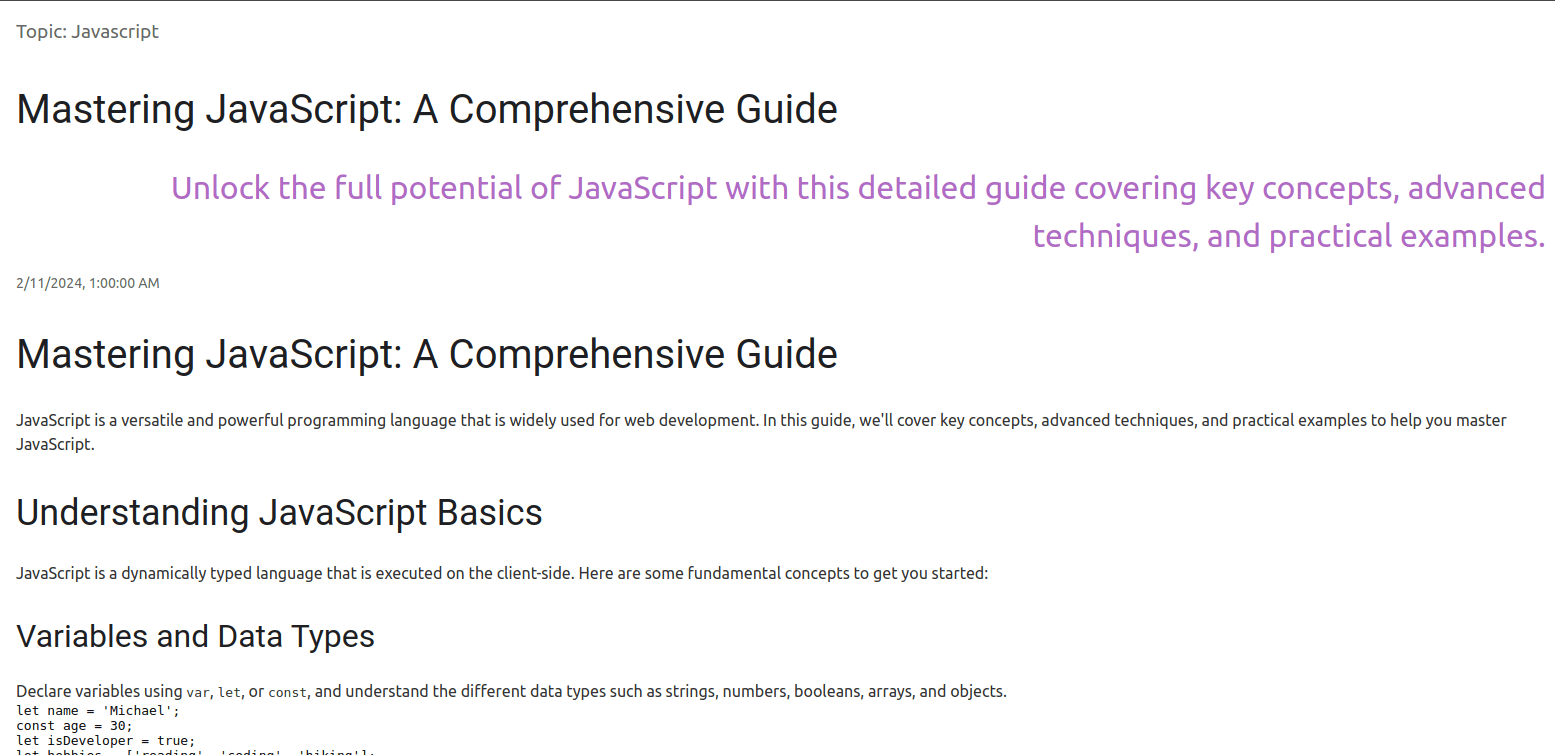
Please notice the getStaticParams function here. This function is generating all the parameters the slug can take. This means that based on that we know what we can expect and all the other values we can handle in other ways. In our case we are setting dynamicParams to false what means that if we go to any slug that we don't have an article for, we will redirect user to 404 page. Now if we start our development server with yarn dev and go to http://localhost:3000/articles/javascript-javascript-best-practices-tips-and-tricks-for-efficient-development we can see our article rendered on the page. Maybe it is ugly but at least we know it works as intended.
One extra thing we can do also here before we finish this long article is to add a link component around each of our articles in the ArticlesPage, to allow user to navigate to an article by clicking on it. Here is the updated ArticlesPage in app/article/page.tsx
1import { ARTCILES_ROUTE, ARTICLES_DIRECTORY } from '@/constants';
2import { FileService, MdArticleService } from '@/lib/services';
3import Link from 'next/link';
4const fileServcie = new FileService();
5const articlesService = new MdArticleService(ARTICLES_DIRECTORY, fileServcie);
6export default async function ArticlesPage() {
7  const articles = await articlesService.getAll();
8  return (
9    <section>
10      {articles.map(({ date, description, slug, title, topic }) => (
11        <Link href={`${ARTCILES_ROUTE}/${slug}`} key={slug}>
12          <article>
13            <h2>
14              {topic} - {title}
15            </h2>
16            <p>{description}</p>
17            <time dateTime={date.toISOString()}>{date.toDateString()}</time>
18          </article>
19        </Link>
20      ))}
21    </section>
22  );
23}
We are importing Link component from next/link which basically works as an anchor tag. We also have to declare the ARTICLES_ROUTE constant in constants.tsx
1// ...
2export const ARTCILES_ROUTE = '/articles';
Now if we go to http://localhost:3000/articles we can click on each of our articles to open it. Not it's time to do the final commit.
1git add .
2git commit -m "feat: create article page"
After that, as described in Linting and formatting we open the pull request and merge it back to the main branch. And that's all in this a bit long article. I hope you enjoyed it and see you in the next one where we are going to look at unit tests setup. Setting up unit testing